
powerschool:parent_portal:instructions
This is an old revision of the document!
Washington County Schools Parent Portal Instructions
Before setting up your account, your school must provide you with an Access ID and Access Password for each of your children. These can be picked up at your student’s school.
Setting Up Your Parent Portal Account
- Please navigate to the following website: http://powerschoolapp.wcs.k12.va.us/public/home.html This is the screen you would normally log into to access the Parent Portal, but first you must setup your username.
- Select the Create Account tab on the top of the screen.
- Click the Create Account button.
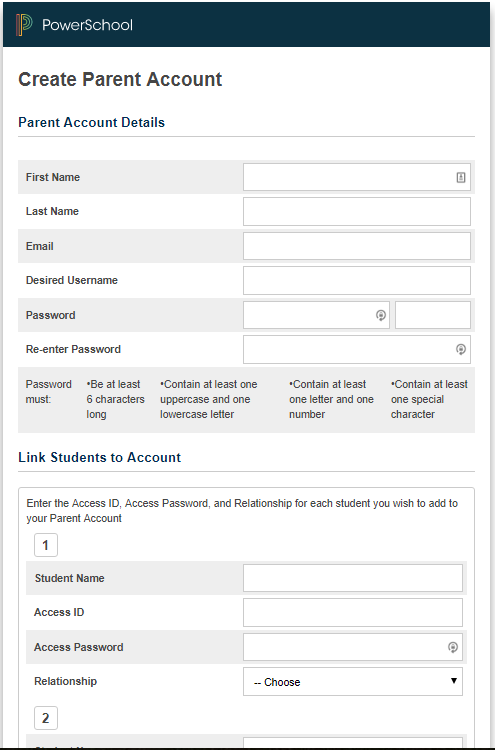
- The top half of the following screen will ask for your first and last name, email address, and a password.
The password must be at least 6 characters with other specific requirements. - On the bottom half of the screen it will ask you which students you want to attach to your account.
Type the Student Name, enter the Access Id and Access Password that your school provided you, and choose your relation to the student. See below for an example:
- Click Enter at the bottom of the screen. You will see a Congratulations message if everything went okay. You can then go ahead and log into your account.
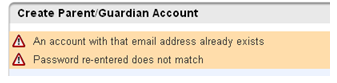
- If there were any errors, for example the “username” or “email” was already in use, those errors will display at the top and allow you to correct the information.
- Once you setup your account and have forgotten your username or password, click the “Forgot Username or Password?” link on the Parent login page to get the user and/or password emailed to the email address that you used to setup the account.


Here is a quick training video for your convenience. https://www.youtube.com/watch?v=vYiLCN89vkg&feature=youtu.be]]
powerschool/parent_portal/instructions.1505312020.txt.gz · Last modified: by jrhea