
kronos:employee_fix_missed_punch
Table of Contents
Fix a Missed Punch
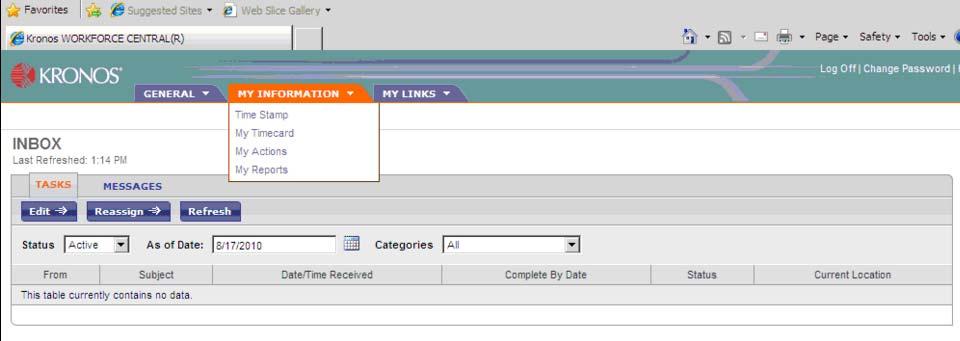
- Log into Workforce and select My Actions from the My Information tab
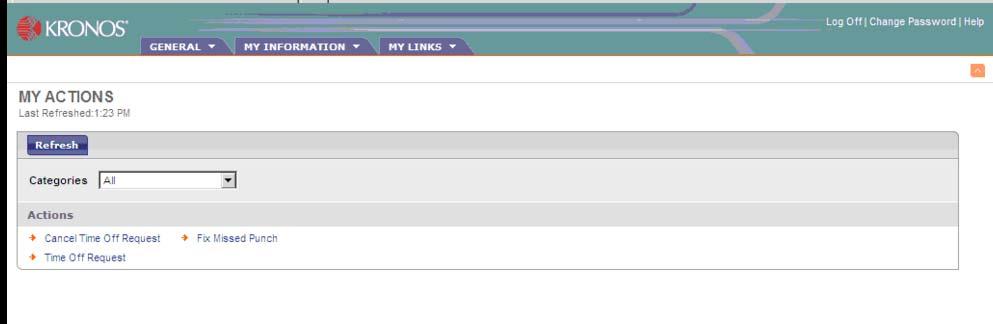
- Select Fix Missed Missed Punch from the list of actions
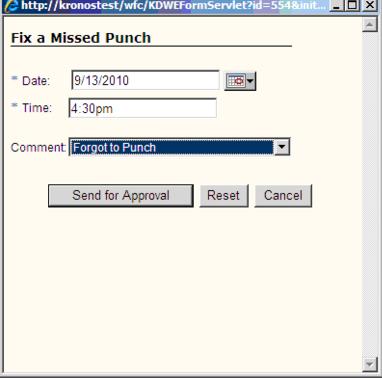
- Fill in the Fix Missed Punch form and click Send for Approval. A notification will be sent to your manager for approval.
- Date should be the date of the punch to be added.
- Time should be the time of the punch to be added.
- Comment should be picked from the drop down list.
- You will receive a notification in your inbox once approved or rejected.


Notifications
To see the notification select Inbox from the General tab and click on Messages

To review the notification select it from the list and click Open

Before and After Correction
Timecard before missed punch is fixed

Timecard after fix missed punch is approved.

kronos/employee_fix_missed_punch.txt · Last modified: by cedwards